
Making Tax Digital,
without the accountant.
TapTax is the HMRC-recognised tax app built only for sole traders. Upload your bank statement, snap your receipts, see what you owe as you earn, and send each quarterly update to HMRC in a tap. Free to start, from your phone.
A short animation of the TapTax app: importing a bank statement, scanning a receipt, seeing your tax estimate update, and filing a quarterly update to HMRC in one tap.
- MTD-compatible
- Bank-level encrypted
- Files straight to HMRC
- Built for quarterly updates
01The rule
Quarterly.
4 updates a year. Straight to HMRC.
What is Making Tax Digital for Income Tax?
Making Tax Digital for Income Tax is HMRC's new way of filing. Instead of one return a year, you keep digital records and send HMRC four quarterly updates, then confirm the year with a final declaration. TapTax keeps the records HMRC requires and files each update for you.
- Keep digital records of your income and expenses
- Send four quarterly updates to HMRC
- Submit your tax return (the final declaration) through the same software by 31 January
Making Tax Digital for Income Tax: what changes and when
It comes down to your qualifying income: self-employment and property income before expenses. HMRC is bringing it in over three years, starting with the highest earners.
From April 2026In force
Over £50,000
Self-employed people and landlords with qualifying income over £50,000. Four quarterly updates to HMRC, plus a final declaration.
From April 2027
Over £30,000
Extends to qualifying income over £30,000.
From April 2028
Over £20,000
Extends to qualifying income over £20,000.
02The problem
Four updates a year. Nobody asked if you had the time
Once your qualifying income is over the threshold, Making Tax Digital means digital records and an update to HMRC every quarter, sent from software. Most of that software was built for accountants and priced like it. TapTax is built only for sole traders: upload your bank statement, snap receipts as you go, and send each update in a tap. No spreadsheet, no jargon, and no accountant unless you want one.
“Forced to pay for software I don’t really want for my simple affairs.”
Sole trader, cycling forum
“I’ve looked at it and I haven’t got a clue.”
eBay and Etsy seller, UK Business Forums
“My accountant has just quoted me £25 per month for submitting quarterly.”
Self-employed, Facebook group
Software you never asked for
HMRC changed the rules and the bill landed on you. TapTax is free to start, and £4.99 a month covers every quarterly update.
Software built for accountants
Ledgers, journals and two hundred menu items. You need five things: your income, your expenses, your receipts, what you owe, and a button that sends it to HMRC.
A new fee, four times a year
Four updates a year can mean four more things to pay someone for. Send them yourself in a tap, or have an accountant check your figures first on the Reviewed plan.
A spreadsheet is not enough
Making Tax Digital needs digital records sent from compatible software. Upload your bank statement and TapTax keeps them for you. No formulas, no retyping.
No idea what you will owe
Most people learn what they owe on the day they file. TapTax shows your tax as you earn, so the bill is a figure you have watched all year.
Bank links that keep breaking
Other apps ask for your bank login, then ask again every 90 days. TapTax reads the statement you upload, PDF or CSV, from any major UK bank.
Not anymore.
Tap.File.Done.
03How it works
From bank statement to HMRC, in one app.
Five steps, and the first four happen as you work. By the time a quarter ends, the update is already written. You check it and tap.
01 / Import
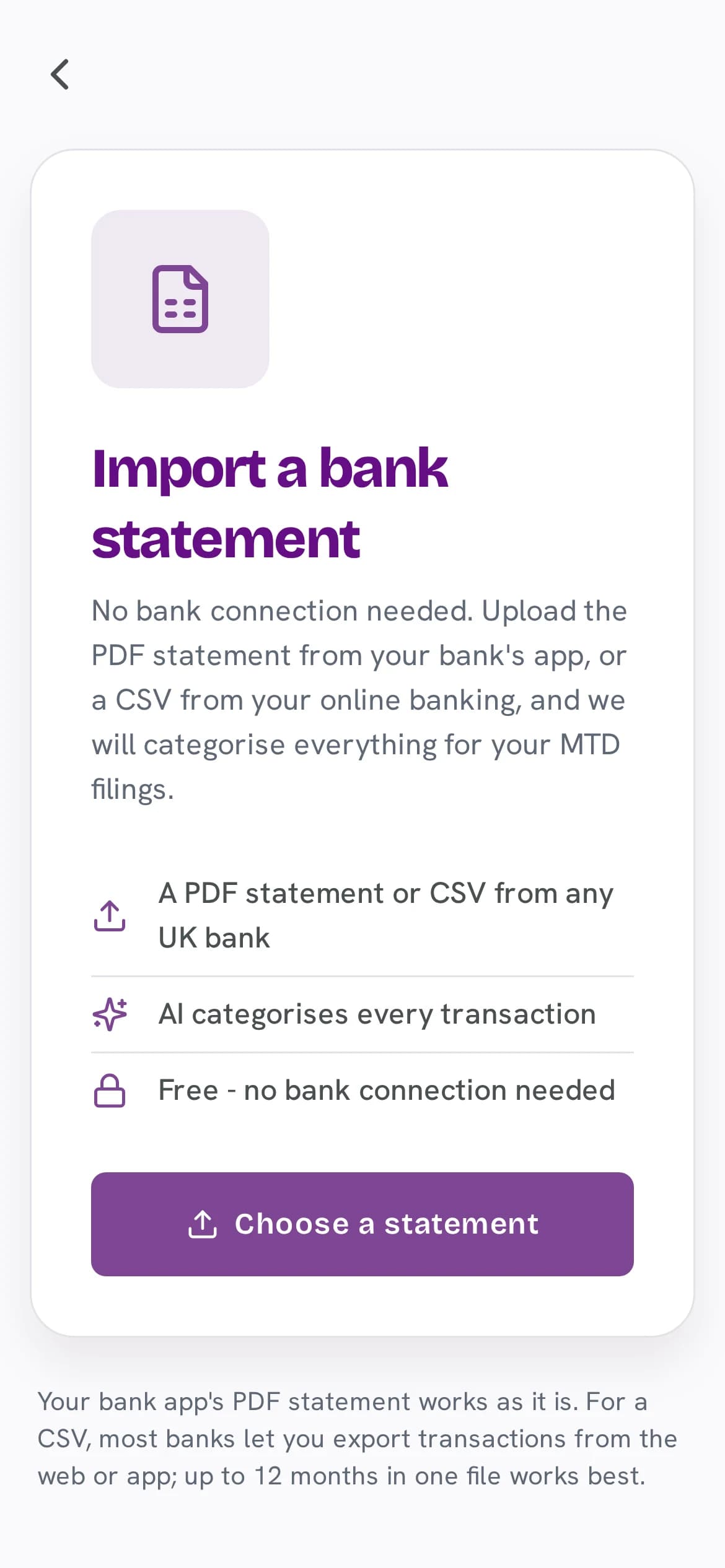
Upload your bank statement
Download the statement from your banking app, PDF or CSV, and upload it. Barclays, HSBC, Monzo and the other major UK banks are recognised, and an overlapping statement never counts twice. No bank login to hand over.
See how bookkeeping works02 / Sort
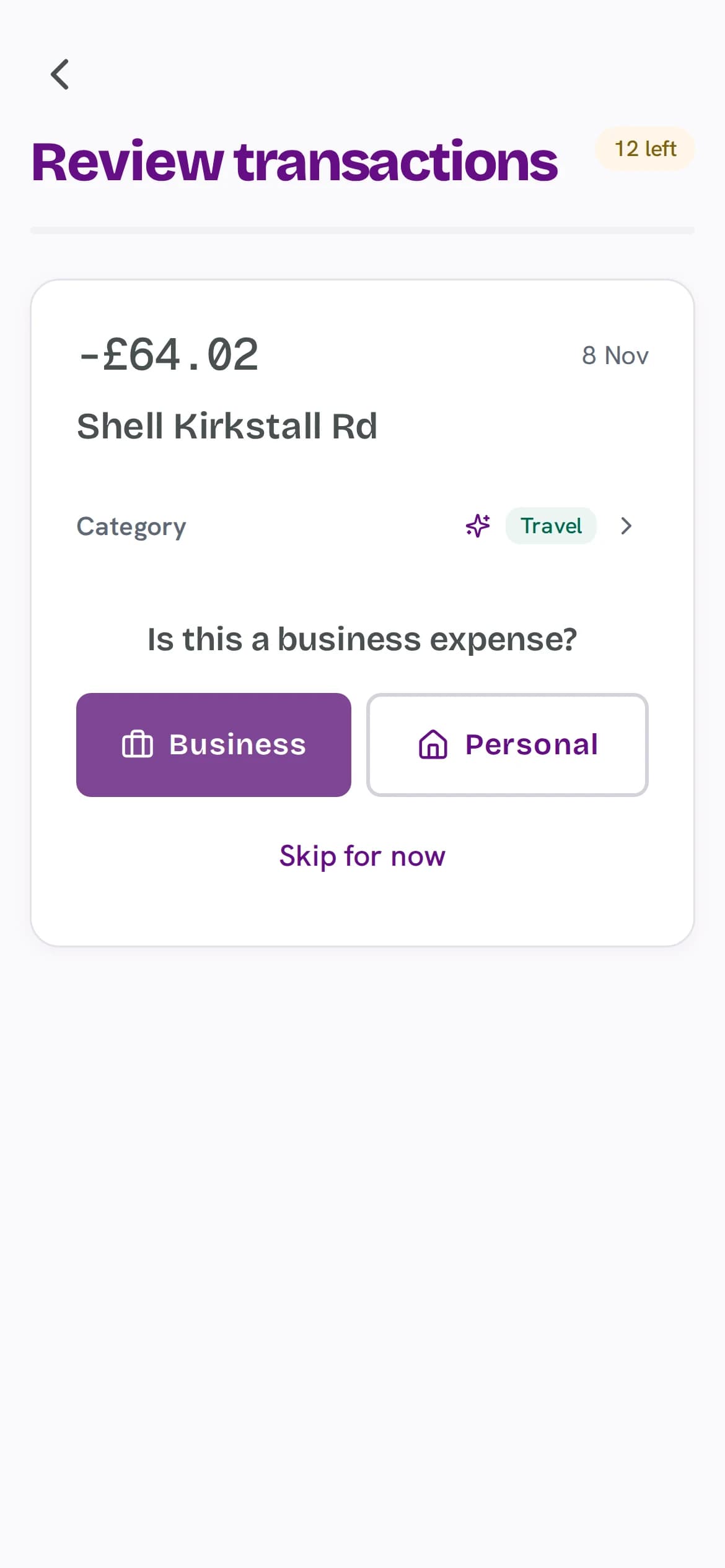
Sorted for you, checked by you
TapTax suggests the HMRC category for each transaction. You confirm business or personal with one tap. No ledgers, no double entry.
03 / Snap
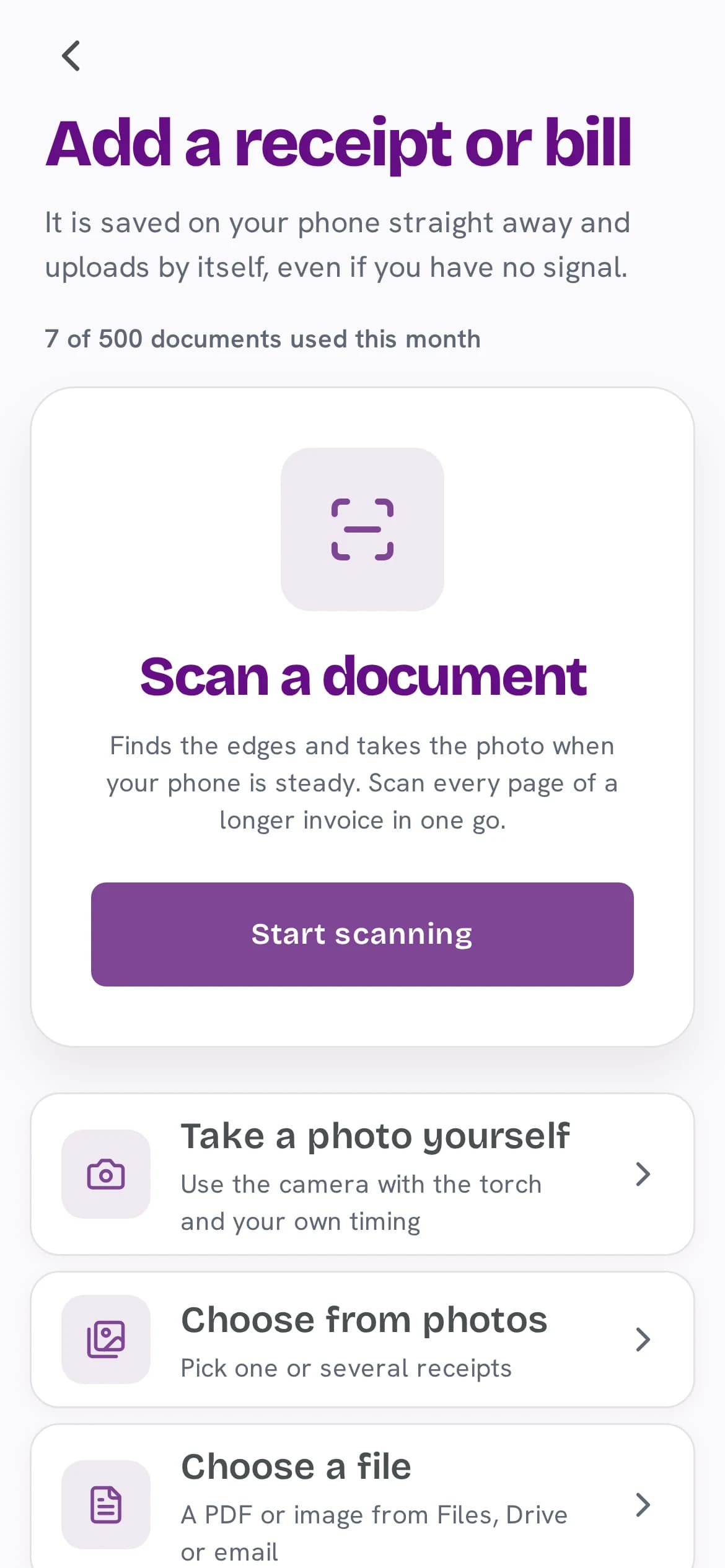
Snap the receipt before you lose it
Photograph it and TapTax reads the supplier, the total and the date, then keeps it as the digital record HMRC asks for.
See receipts and bills04 / Know
Know what you owe, as you earn
Income tax, National Insurance and take-home pay update as money moves. The bill is a figure you have watched all year.
Try the calculators05 / File
Send it to HMRC in a tap
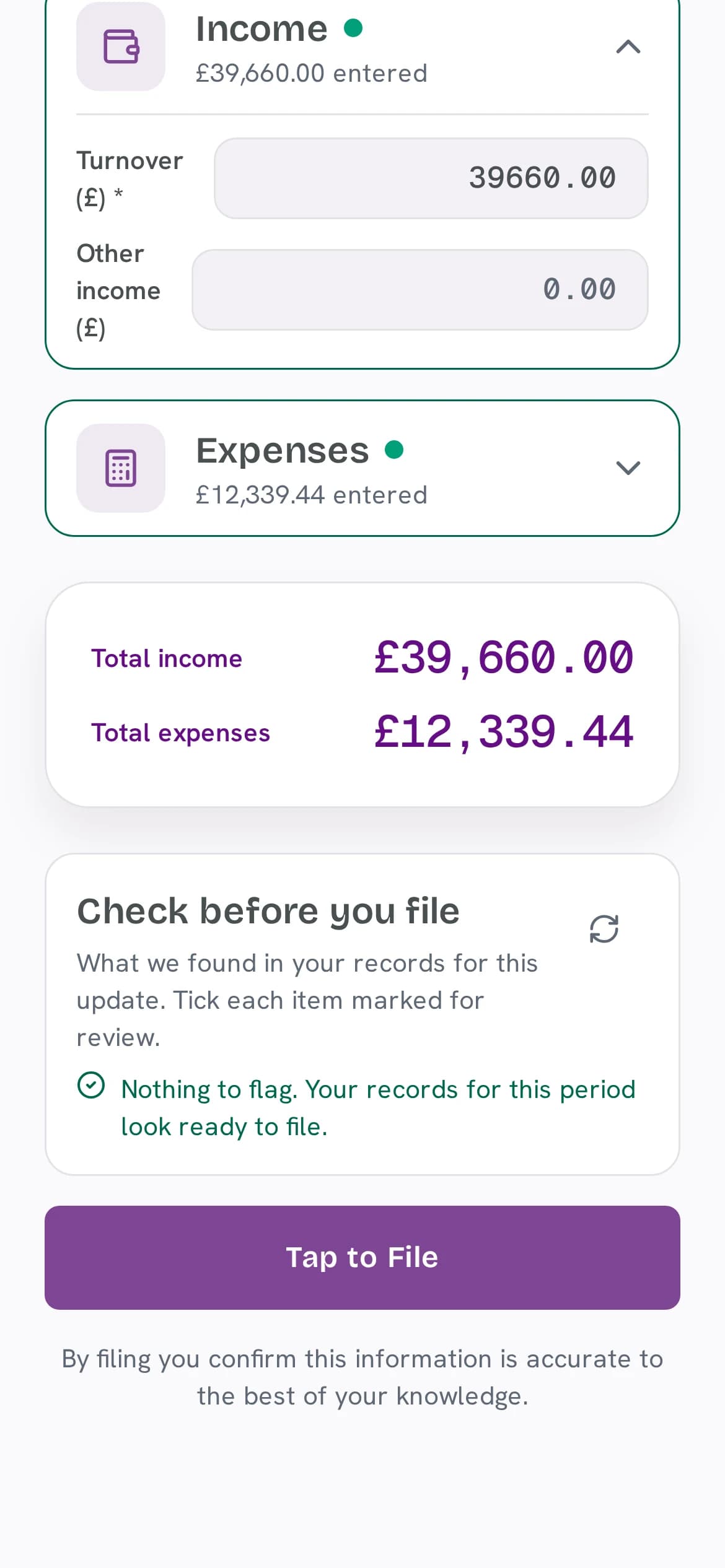
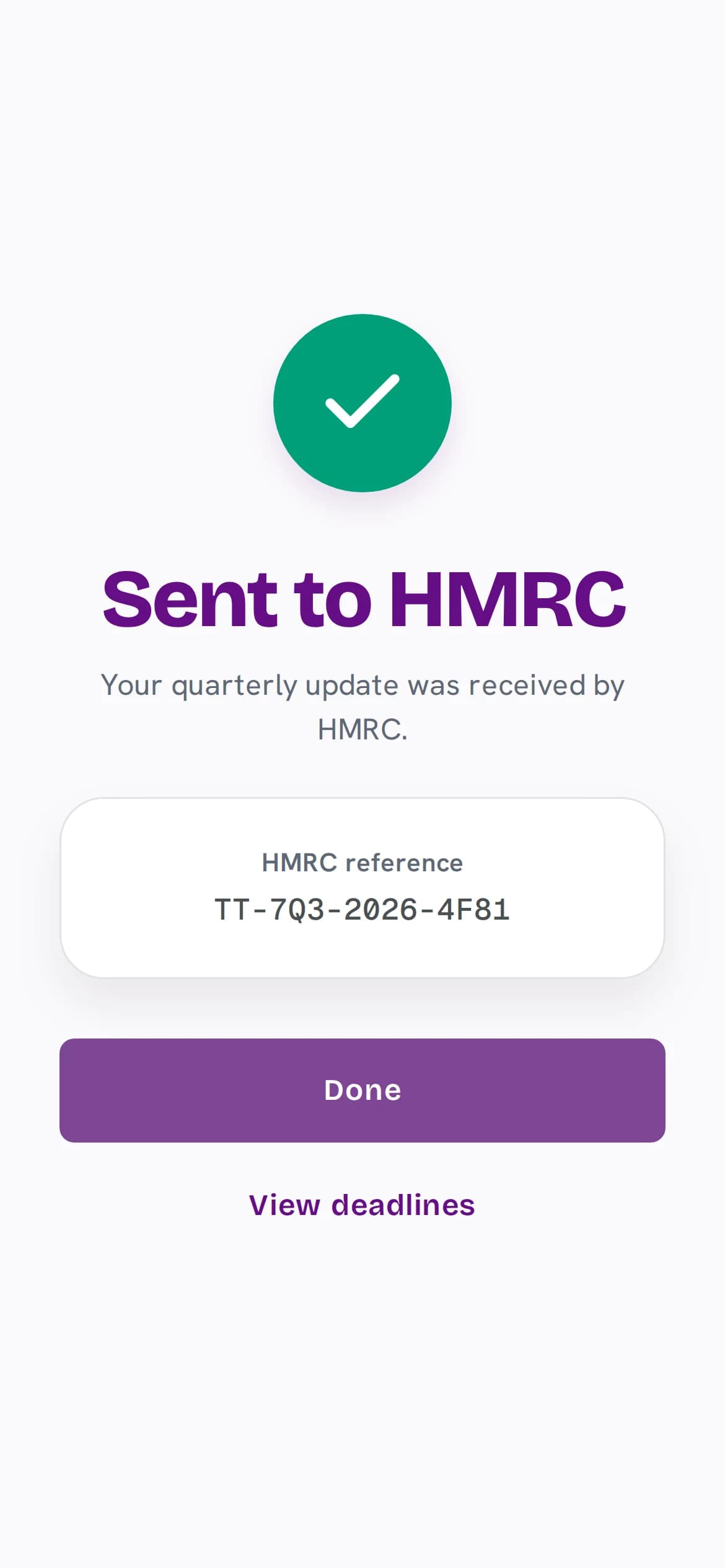
Check your totals, tap once, and your quarterly update goes straight to HMRC. So does the final declaration when the year ends.
See how filing works
04The film / 43s
Making Tax Digital, in 43 seconds.
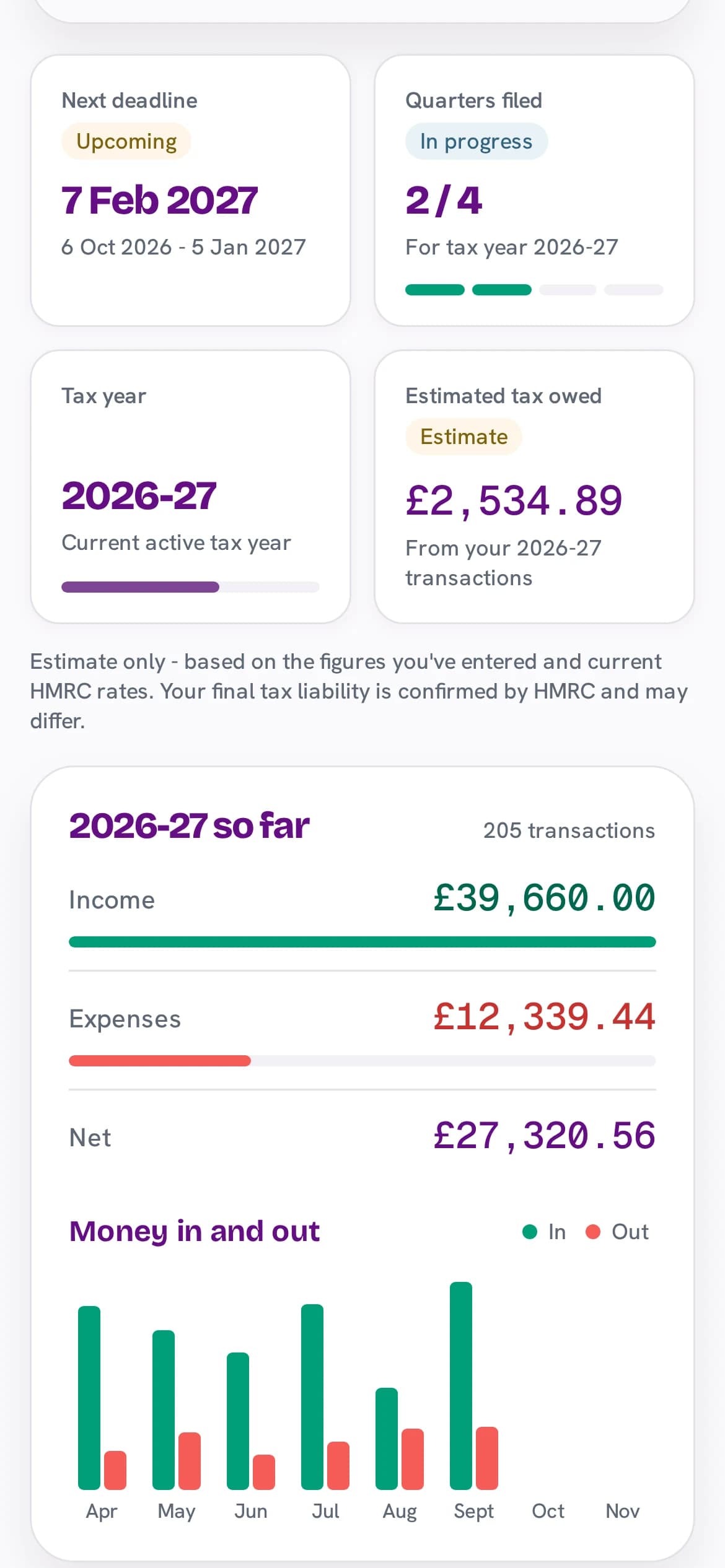
The two questions sole traders ask about Making Tax Digital, answered on the real TapTax app: upload your statement, snap a receipt, see what you owe as you earn, then send your quarterly update to HMRC in a tap.
What happens in the film
- Making Tax Digital is here, from 6 April 2026.
- Four updates a year, sent to HMRC from software.
- What sole traders ask Google: do I have to pay for it? Do I need an accountant?
- No. You need one app: TapTax.
- Upload your bank statement, and every line is sorted for HMRC. You just check it.
- Snap a receipt before you lose it: the supplier, the total and the date are read from the photo.
- See what you owe, as you earn: an estimated £2,534.89.
- When the quarter ends, send it to HMRC in a tap.
- On iPhone, Android and the web. Built only for sole traders.
- Free to start, no card needed.
- Making Tax Digital, without the accountant. Start free at taptax.co.uk.
05The product
Four products. One app.
Filing, receipts, invoices and your books, together, so the numbers you send HMRC come from the work you already did.
- MTD filingQuarterly updates and your year end, sent to HMRCSee how it works
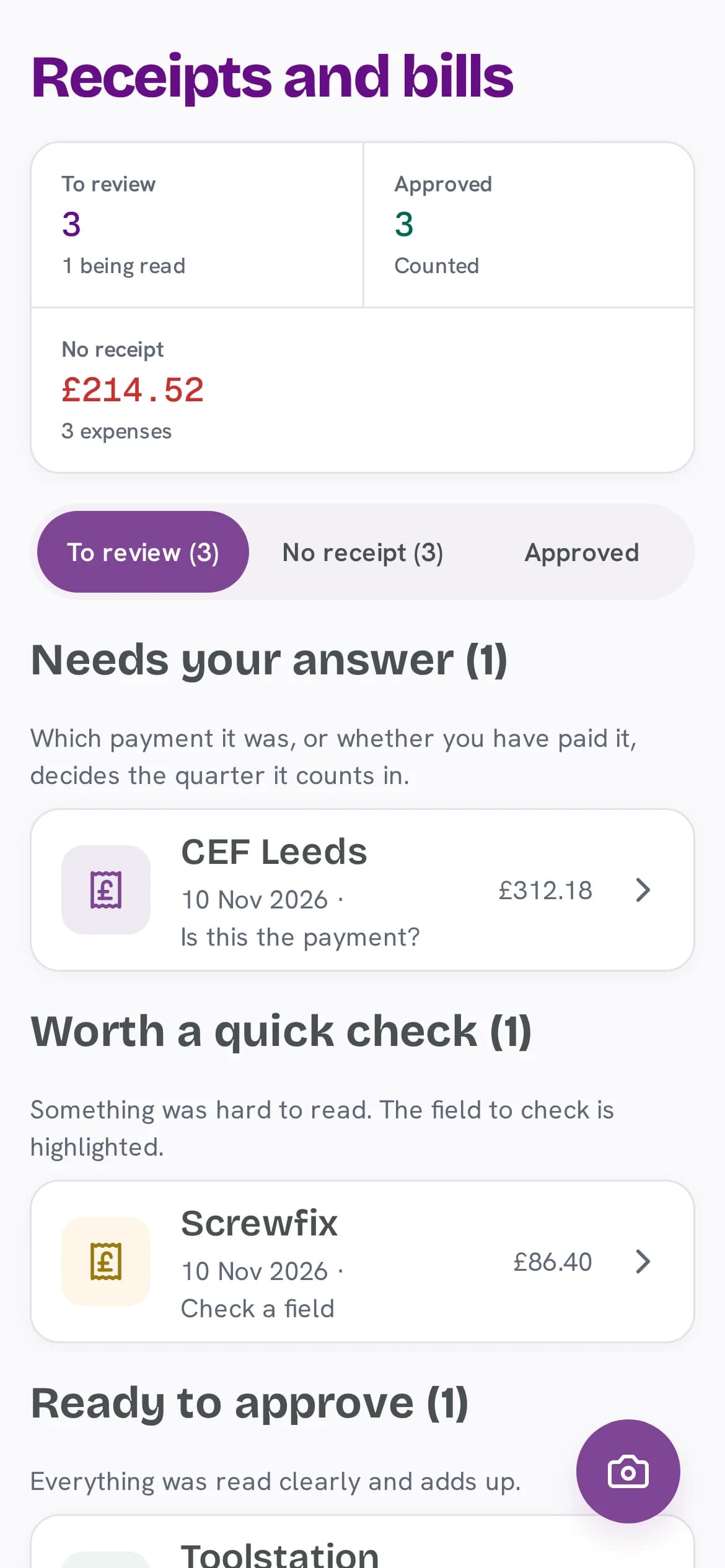
- Receipts & billsSnap a receipt or drop a bill: read, checked and countedSee how it works
In your pocket.
Compare all fourBank statement import
Import your bank statement in minutes.
Download the PDF statement from your banking app, or a CSV, upload it to TapTax and your transactions arrive ready to sort. No retyping, no spreadsheets. TapTax sorts income from expenses so your quarterly MTD updates are ready to file.
Presets for 16 UK banks
Columns are matched for you. Any other bank works with a quick one-off mapping.
No double counting
Upload an overlapping statement and TapTax skips the transactions it already has.
Bank sync coming soon
Direct, read-only bank connection is on the way. Statement import is free on every plan.
Statement presets for major UK banks
Don't see your bank? Any UK bank's PDF statement works as it is, and a CSV works with a quick column match.
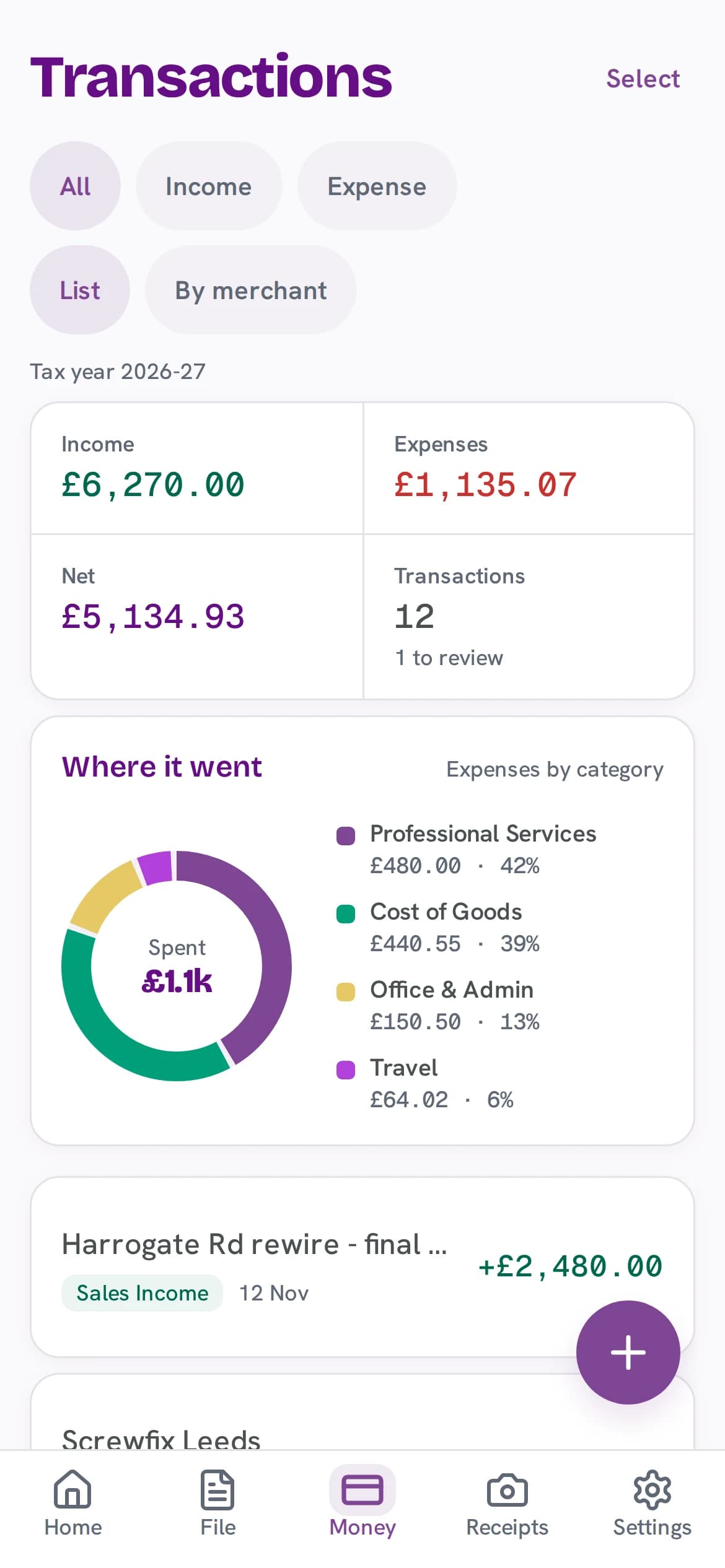
In Claude
Get my Q2 update ready
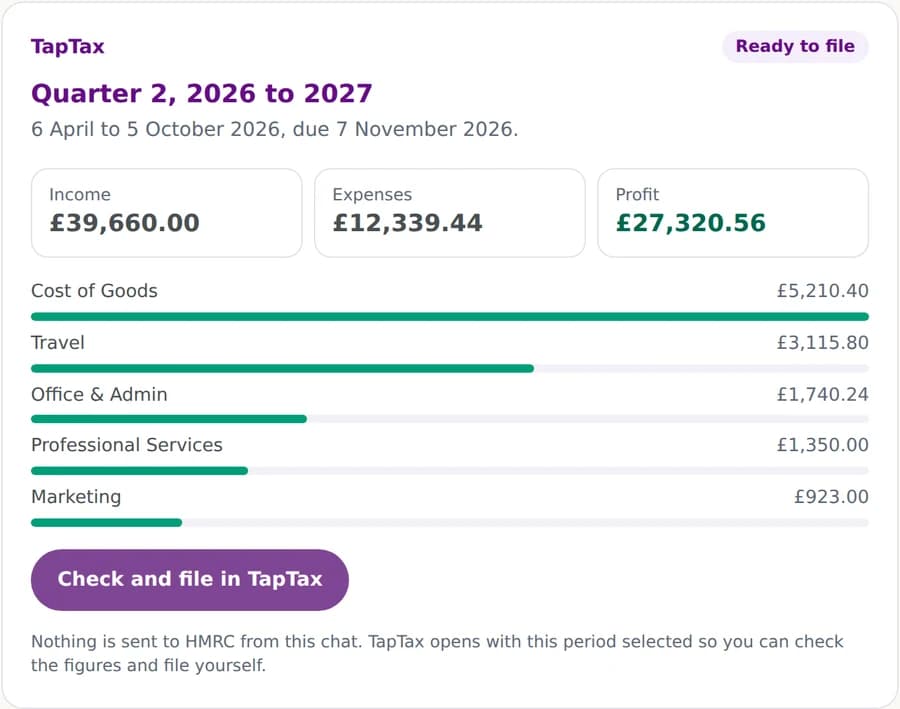
TapTax in Claude
Ask Claude. TapTax keeps the books.
Connect TapTax to Claude and run your self-employed admin in a conversation. Claude reads your TapTax records, adds what you tell it, and gets your Making Tax Digital update ready. You stay in charge of what it can see and change.
Answers in plain English
Ask what you owe so far, what is due next, or what still needs sorting.
Books kept from a chat
Log a receipt from a photo, clear your review queue, send and chase invoices.
Filing stays one tap
Claude prepares your quarterly update; you check it and file in TapTax.
Free on every TapTax plan. The tax estimate and tax code tools work without an account.
Free tax code checker
Are you on the
wrong tax code?
5.6 million UK workers overpay HMRC every year. The average refund is £625. Check yours free in 60 seconds.
No signup required • Covers all UK tax codes • 2026/27 rates
06Free tools
Free UK tax calculators, no sign-up needed
Work out exactly what you owe before you file. Every calculator is free, instant and built on the latest 2026/27 HMRC rates.
- Sole trader taxIncome tax + Class 4 NI
- Capital gains taxOn shares, crypto and property
- Dividend tax2026/27 rates and allowance
- Rental income taxLandlord profit after costs
- CIS subcontractorTax deducted and refund due
- Mileage allowanceHMRC approved per-mile rates
- VATAdd or remove 20% VAT
- Salary / take-homePAYE pay after tax and NI
- Salary vs dividendsThe tax-efficient split
- IR35Inside vs outside take-home
- Sole trader vs limitedWhich structure pays less
- Quarterly MTD plannerPlan your four updates
07Built for your trade
Built for your line of work
Whatever you do, the tax rules are different. We have plain-English guides and the right expense categories for 270+ self-employed trades.
Your tax companion
We are with you all the way.
Tax does not have to be stressful. Start free, stay in control, and call in a human whenever you want the reassurance of a second pair of eyes.
Free to start, cancel anytime
Open a free account with no card and no commitment. Track your income, expenses and live tax estimate forever, and upgrade only if you need to. Cancel whenever you like.
Plain English, no jargon
We explain what is allowable, what is not, and what HMRC actually needs from you in plain English. Bite-sized explainers and smart reminders, not a textbook.
A human on hand if you want one
Prefer a second opinion? On the Reviewed plan an accountant checks your figures before you file. UK-built and honest about what we can and cannot do.
08Security and privacy
Your data stays yours
TapTax is built privacy-first, on UK and EU infrastructure, with no selling of your data, ever.
No bank login needed
You import transactions from a CSV statement, so TapTax never sees your bank login and can never move your money.
Bank-level encryption
Your data is encrypted in transit and at rest. We never see or store your banking login.
Files straight to HMRC
Submissions go directly to HMRC's Making Tax Digital service over a secure connection, with the fraud-prevention checks HMRC requires.
GDPR and you in control
Export or delete your data whenever you want. We will never sell it.
09Simple pricing
Start free. Upgrade only if you need to.
No setup fees, no surprises, cancel anytime. Billed monthly, or save with annual.
Save up to 18% with annual billing
Free
Get started, no card needed
- Digital records and HMRC connection
- Manual entry and CSV bank-statement import
- Tax estimate dashboard
- 1 quarterly submission
- Up to 3 invoices
- Receipt scanning, 5 a month
Starter
Billed monthly
- Everything in Free
- AI expense categorisation
- Receipt scanning, 50 a month
- All quarterly submissions
- Unlimited invoicing
- Bank connection with daily sync Coming soon
Pro
Billed monthly
For every income you have, not just the trade.
- Everything in Starter
- Property income, UK and overseas
- Filing for all of your businesses
- Other income, from dividends to savings
- Tax reliefs
- Loss claims
- Year-end adjustments
- Mileage tracking at HMRC rates
- Bulk editing: sort many transactions at once
- Merchant rules: sort each new statement automatically
- Receipt scanning, 500 a month
Reviewed
Billed monthly
- Everything in Pro
- Accountant check each quarter
- Year-end final-declaration review
Reviewed vs a one-off review
At £149/year, Reviewed costs about the same as a single one-off review elsewhere, but you get an accountant partner check every quarter, every year, plus a year-end review before you file. Same price, far more cover.
Reviewed vs a monthly bookkeeper
Bookkeeping bundles run £29 to £49 a month. Reviewed is review-only: you keep your own books on AI-categorised, bank-fed data, and an accountant partner just checks and signs off, so it lands at roughly a third of the price.
Reviewed includes a check on your figures by an independent accountant partner. The partner reviews and signs off; you keep your own HMRC connection and file the MTD-compatible submission yourself. The year-end review is included on the annual plan or after 3 paid months.
10Why TapTax?
See how we compare
The others were built for accountants and small companies, then sold to the self-employed. TapTax was built only for sole traders. Here's how we stack up.
Feature
TapTax
Best valueXero
QuickBooks
FreeAgent
TapTax
Best valueXero
11Get started
Up and running in three simple steps
Coming from a spreadsheet, an accountant or another app? You can be set up before your tea goes cold, and your first quarterly update is three steps away.
Step 01
Create your free account
Sign up in a couple of minutes, no card required. Your free plan tracks income, expenses and a live tax estimate from day one.
Step 02
Import your bank statement and transactions
Upload the PDF or CSV statement from Barclays, HSBC, Monzo or any major UK bank. TapTax reads your transactions and sorts them into the right tax categories. Bank sync is coming soon.
Step 03
File your quarterly update to HMRC
Check your totals and tap. TapTax sends your Making Tax Digital update straight to HMRC, and shows you when the next one is due.
- Start freeCompare TapTax vs the rest
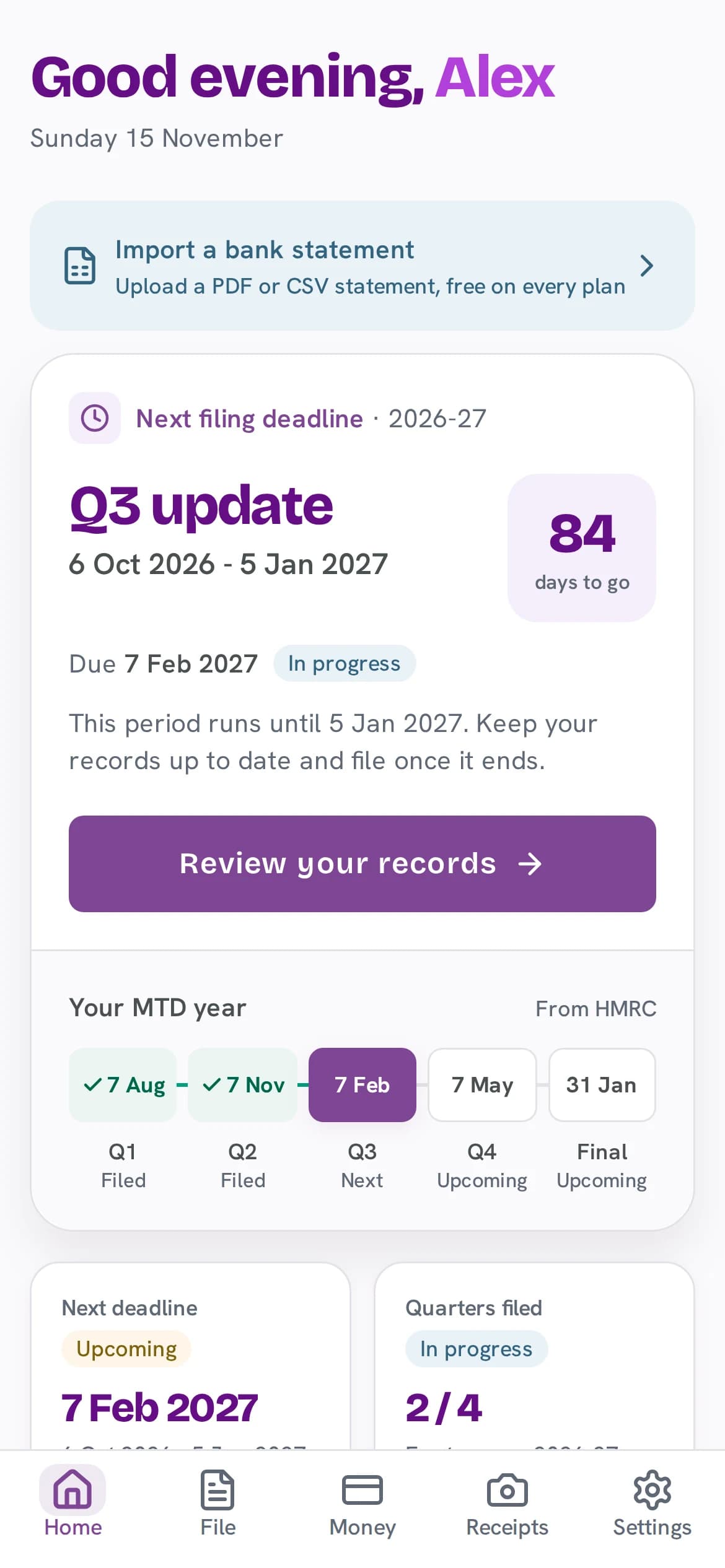
Next quarterly update due
7 February 2027
For the standard quarter 6 October to 5 January.
Set up in minutes. Your next quarterly update is already counting down.
Tap.File.Done.
Four updates a year, each one a tap. Making Tax Digital without the accountant, the spreadsheet or the software built for someone else. Free to start, no card needed.
- Free to start
- HMRC-recognised
- Built for your phone
- No card needed